Y999 ICD 10 Withdraw – How to Request a Withdrawal
Y999 ICD 10 Withdraw is the process of requesting money from an eligible account balance. Before making a request, users should check the available withdrawal options, account rules, and payment details. This helps reduce errors and keeps the transaction process clear.

The withdrawal process may involve opening the wallet, selecting Withdraw, entering an amount, and confirming the payment details. However, the exact steps depend on the options supported by the current platform. Always follow the instructions shown in your own account.
What Is Y999 ICD 10 Withdraw?
Y999 ICD 10 Withdraw refers to a request to transfer an eligible account balance through a payment method supported by the platform. The available options and conditions may vary based on account status and current payment rules.
Before requesting a withdrawal, check these details:
- Available balance: Confirm the amount that can be withdrawn.
- Withdrawal method: Review the payment options shown in your account.
- Minimum and maximum limits: Check the transaction limits before entering an amount.
- Account requirements: Review any verification or account conditions.
- Processing rules: Read the expected processing time and applicable fees.
A displayed balance does not always mean the full amount is available for withdrawal. Some platforms apply separate rules to bonuses, pending funds, or promotional credits. Check the terms before submitting a request.
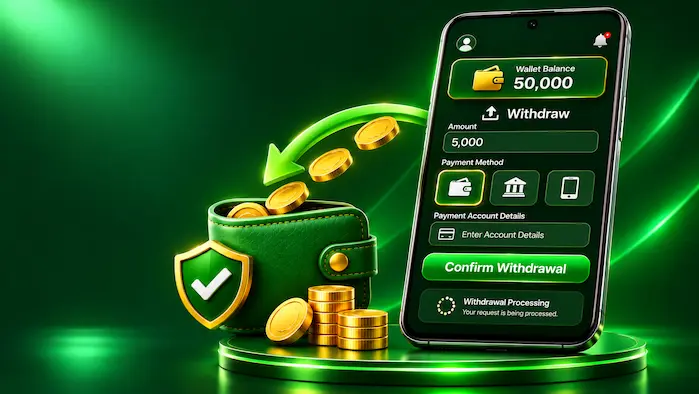
How to Withdraw Money from Y999 ICD 10
The following steps explain a general withdrawal process. The actual fields and options may differ from the current platform version.
- Open your account: Sign in through the correct platform or application.
- Open the wallet: Find the Wallet, Balance, or account funds section.
- Select Withdraw: Choose the withdrawal option if it is available.
- Review the available balance: Check how much you can request.
- Choose a payment method: Select one of the methods displayed in your account.
- Enter the amount: Type an amount within the stated limits.
- Add payment details: Enter the information requested by the withdrawal form.
- Review the request: Check the amount and recipient details before continuing.
- Confirm the request: Submit it through the available confirmation option.
- Check the transaction status: Keep the reference number and review the withdrawal record.
Make sure the payment details belong to you and match the information requested by the platform. Never send your password or verification code to another person to complete a withdrawal.
Y999 ICD 10 Withdrawal Methods in Pakistan
Payment options matter when users want to receive money in Pakistan. However, the supported methods can change, and an option may not be available to every account.
Open the withdrawal section to see the methods currently listed. Do not assume that a mobile wallet, bank account, or other payment service is supported unless it appears in the actual payment form.
Before choosing a method, review:
- Availability: Confirm that the method appears in your account.
- Recipient details: Check the account number or other requested information.
- Account ownership: Use payment details that belong to you.
- Transaction limits: Review the minimum and maximum amounts.
- Fees: Check for charges before confirming.
- Processing rules: Read the stated time and conditions.
If your preferred method is missing, contact verified support. Do not use payment details sent by unknown people or unofficial groups.
Minimum and Maximum Withdrawal Limits
Withdrawal limits control the amount users can request in one transaction. The platform may set a minimum amount, a maximum amount, or both. For More Information Visit Our Y999 ICD 10 Game.
These limits may depend on the payment method and account rules. Check the values displayed in your withdrawal section before submitting a request.
Keep these points in mind:
- Enter an amount that meets the stated minimum.
- Do not exceed the maximum limit.
- Check whether the limit applies to one request or a wider period.
- Review any fees or deductions.
- Read the rules for promotional or restricted balances.
If the platform does not show clear limits, ask verified support before making a request. Do not split transactions to bypass platform restrictions.
How to Check a Withdrawal Status
After submitting a request, check its status before creating another one. This helps prevent duplicate requests and makes it easier to track a delayed transaction.
Follow these general steps:
- Sign in to your account.
- Open the wallet or transaction history section.
- Find the withdrawal record.
- Review its status and reference number.
- Compare the details with your submitted request.
- Contact verified support if the status remains unclear.
A withdrawal record may show a status such as pending, processing, successful, or failed. The exact labels depend on the platform’s system.
Keep the transaction reference until the payment is confirmed. If the request is delayed, use the original record when asking for help.
How Long Does a Y999 ICD 10 Withdrawal Take?
Withdrawal processing time depends on the platform’s review process and the selected payment method. Some requests may need extra checks before they are completed.
Check the expected processing time shown in your account. If the request takes longer than the stated period, review its status before contacting support.
Keep the following information ready:
- Withdrawal reference number.
- Request date and time.
- Requested amount.
- Selected payment method.
- Status displayed in your account.
Do not assume that a pending request has failed. Avoid submitting another request for the same amount until you know what happened to the first one.
Common Y999 ICD 10 Withdrawal Problems and Solutions
A withdrawal may face delays or errors because of incorrect payment details, account restrictions, or temporary technical issues. Review the problem below before taking another step.
Withdrawal Request Is Pending
A pending status means the request has not received final confirmation.
What to do:
- Open your transaction history.
- Check the request details.
- Review the expected processing time.
- Keep the transaction reference.
- Contact verified support if the stated period passes.
Do not submit a duplicate request while the first one is still pending.
Withdrawal Request Is Rejected
A request may be rejected if it does not meet the platform’s requirements.
What to do:
- Read the rejection message.
- Check the amount and transaction limits.
- Review your payment details.
- Check whether the account needs verification.
- Follow the instructions provided by the platform.
If the reason is unclear, ask verified support before submitting another request.
Payment Details Are Incorrect
Incorrect account information can prevent a successful transfer.
What to do:
- Review the payment details entered in the form.
- Check the recipient name and account information.
- Confirm that the details belong to you.
- Follow the correction process provided by the platform.
- Contact support if the request has already been submitted.
Never send payment information to an unknown person who offers to correct it.
Withdrawal Amount Is Not Available
The amount shown in the wallet may differ from the amount eligible for withdrawal. Promotional credits, pending funds, or account conditions may affect the available balance.
What to do:
- Check the available withdrawal balance.
- Review the bonus and wallet terms.
- Look for pending transactions.
- Check the stated withdrawal limits.
- Contact verified support if the difference remains unclear.
Do not assume that every displayed credit can be withdrawn.
Withdrawal Option Is Missing
The withdrawal option may be unavailable because of account status, platform maintenance, or changes to the payment system.
What to do:
- Check whether you are signed in to the correct account.
- Review any account notices.
- Refresh the wallet section.
- Check for a platform service notice.
- Contact verified support if the option remains unavailable.
Avoid using unofficial links that claim to activate withdrawals.
Withdrawal Is Marked Successful but Money Has Not Arrived
A successful status in the platform does not always mean the receiving payment service has updated its record.
What to do:
- Check the recipient account.
- Review the payment reference.
- Confirm the amount and transaction date.
- Contact the payment provider if needed.
- Ask verified platform support for the transfer details.
Keep the original request record until the issue is resolved.
Important Safety Tips Before Requesting a Withdrawal
Withdrawal requests involve personal and financial information. Check every detail before confirming a transaction.
Follow these safety practices:
- Use payment details that belong to you.
- Check the recipient information before submitting.
- Review fees and withdrawal limits.
- Keep transaction references and records.
- Never share your password or one-time verification code.
- Avoid people who promise guaranteed withdrawals.
- Do not pay unofficial agents to release account funds.
- Use only verified platform support channels.
Real-money gaming involves financial risk. A withdrawal request does not guarantee that funds will be approved or transferred. Check the platform’s terms and the laws that apply in your location before using the service.
Advantages and Limitations of the Withdrawal System
A withdrawal feature can provide a way to request eligible account funds. However, users should understand the rules and possible limits.
Advantages
Limitations
Frequently Asked Questions
Conclusion
Y999 ICD 10 Withdraw explains how users can request eligible funds through the payment options provided by the platform. Check your available balance, payment details, limits, and fees before submitting a request. Keep the transaction reference and review its status until the process is complete. Never pay unofficial agents or trust promises of guaranteed withdrawals.